Signal Recovery
Signal Recovery compares Kleerr's first-party website traffic classification against the same period in Google Analytics 4. It shows where GA4 missed, under-counted, or misclassified traffic that Kleerr can classify with stronger source evidence.
Kleerr includes the GA4 comparison for transparency. You should be able to see both views, compare them directly, and understand why they differ before using Kleerr's first-party classification as the operating view.
Use it to answer:
- Which channels did GA4 understate?
- Which sessions did GA4 leave Unassigned?
- Which traffic did GA4 put in the wrong channel?
- Which sources are only visible through Kleerr's first-party classification?
Signal Recovery is session reporting. It is not revenue attribution. For how sessions become attributed order credit, see Attribution overview.
Why Kleerr differs from GA4
GA4 mostly depends on its own collection, default channel grouping, UTMs, referrers, and Google-managed identifiers. Kleerr classifies website sessions with additional first-party and platform-specific evidence:
- Kleerr ad tracking parameters from connected ad platforms;
- standard UTMs;
- supported click IDs such as gclid, fbclid, and ttclid;
- referrer and known platform source patterns;
- first-party browser continuity;
- identity-confirmed continuity where available;
- store and account domains, so checkout and subdomain movement do not create false referrals;
- Builder Tracking Links through the kmi parameter.
This means Kleerr can often preserve the source that actually brought the visitor to the website, even when GA4 reports the session as Direct, Unassigned, Referral, or a broader default channel.
Use this difference to decide whether a reporting gap is a real traffic problem or a measurement problem. If Kleerr recovers a channel GA4 undercounted, the next step is usually tracking hygiene, not a channel strategy change.
For the technical classification rules, see Traffic categorization. For Kleerr URL parameters, see Kleerr parameters.
What the Signal Recovery tab compares
Signal Recovery reads both Kleerr and GA4 for the same date range and compares sessions by channel or source.
Headline cards
The top cards summarize the scale and direction of the correction before you dig into the channel or source table.

- Sessions corrected: the total absolute difference between Kleerr and GA4 across all comparable channels, plus Kleerr-only sessions. This is a magnitude number, not a net lift. It answers, "How much traffic classification changed once Kleerr's first-party logic was applied?"
- Unassigned resolved: sessions GA4 placed in Unassigned that Kleerr classified into a real channel or source. This answers, "How much GA4 unassigned traffic did Kleerr recover into usable reporting?"
- Net recovered: the net session difference where Kleerr saw more sessions than GA4 for the same period. This answers, "How much more traffic did Kleerr observe overall after comparing both systems?"
- Channel winners: when shown, the channels with the largest recovered gains. Direct is excluded from auto-ranking so the card focuses on actionable marketing channels.
Each card includes a period trend line. The percentage under the card compares the highlighted value to the relevant GA4 baseline for the selected period.
Use the headline cards to decide how urgent the discrepancy is. A high Sessions corrected share means GA4 is materially reshaping the traffic story. A high Unassigned resolved number points to source classification gaps. Net recovered helps quantify whether Kleerr observed more total sessions, not just a different channel mix.
Comparison table
The comparison table shows where the correction happened. Use Channel view to compare GA4's channel grouping with Kleerr's channel classification. Use Source view when you need to inspect referring hosts or named sources.
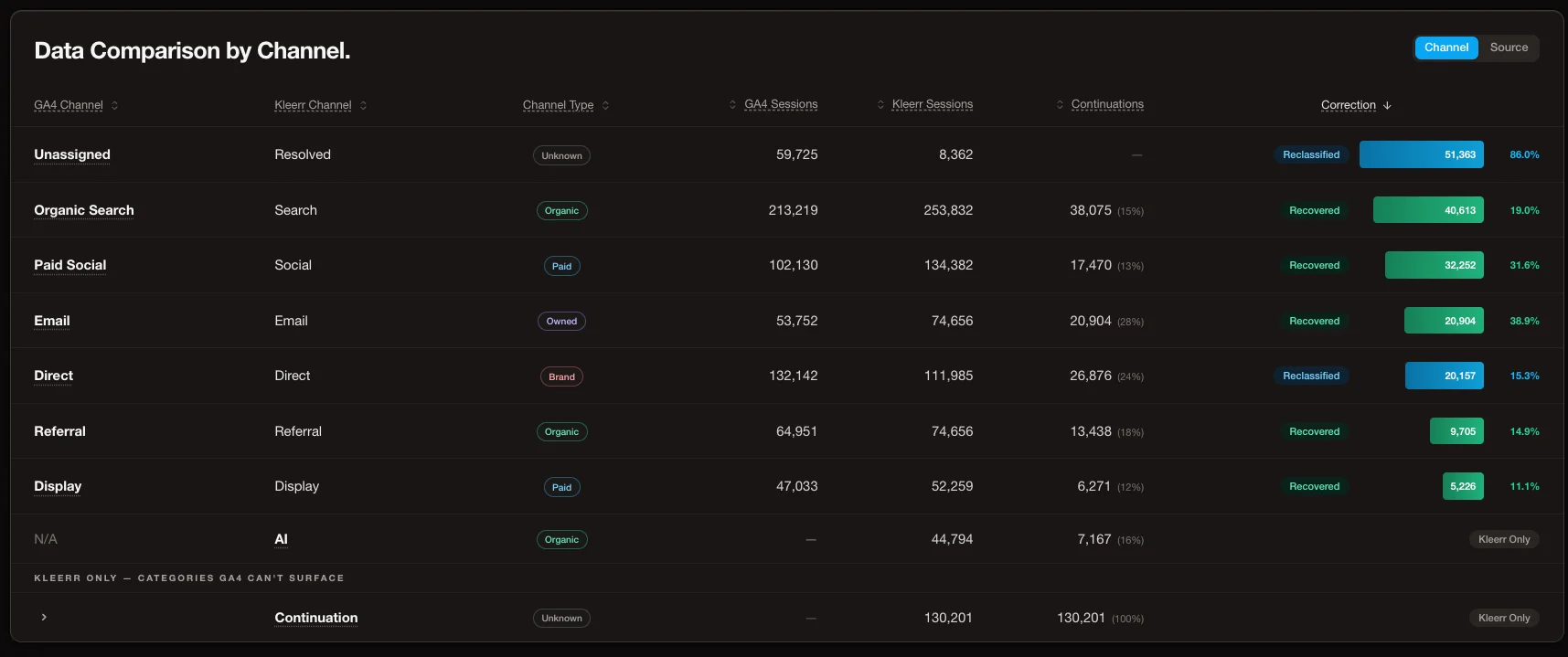
Common row outcomes:
- Matched: Kleerr and GA4 are close for that channel or source.
- Recovered: Kleerr saw materially more sessions than GA4.
- Reclassified: Kleerr moved sessions out of a GA4 bucket and into a more specific source or channel.
- Kleerr Only: Kleerr can show a category GA4 does not surface clearly, such as AI referrals or continuation sessions.
Use the table to decide where to investigate. Recovered paid traffic points to ad tracking or click-ID coverage. Reclassified Direct or Unassigned traffic usually points to missing UTMs, redirects, consent/cookie loss, or channel grouping limits. Kleerr Only rows show behavior GA4 does not model cleanly, such as AI referrals or continuation.
GA4 Unassigned vs Kleerr classification
GA4 Unassigned means GA4 could not place the session into one of its default channel groups. It does not necessarily mean the visit had no source.
Kleerr may resolve those sessions when other evidence is available, such as Kleerr ad parameters, click IDs, first-party continuity, recognized referrers, or tracking-link context.
Continuation (no source) is different. It means Kleerr can tell the visit is a continuation of an existing journey, but there is no reliable earlier marketing source to carry forward.
Use this distinction when reconciling reports. GA4 Unassigned asks, "Why didn't GA4 classify this?" Continuation (no source) asks, "Why did this returning journey have no usable source to preserve?"
Requirements and caveats
Signal Recovery requires:
- a connected Kleerr pixel;
- a connected Google Analytics 4 property;
- overlapping dates where both Kleerr and GA4 have data.
The comparison uses GA4 as the baseline because it reads your connected GA4 property directly. If the selected date range starts before Kleerr pixel data exists, the comparison clips both systems to the same available period.
Use Signal Recovery after major tracking changes, channel launches, agency handoffs, or unexplained GA4 channel shifts. It is also useful before presenting GA4 traffic trends externally, because it shows which parts of the story Kleerr can verify or correct.