Flows
Flows turn Kleerr's signals into repeatable marketing workflows. A flow can enroll users, wait, branch, split, update segment membership, and run Actions that define what happens next.
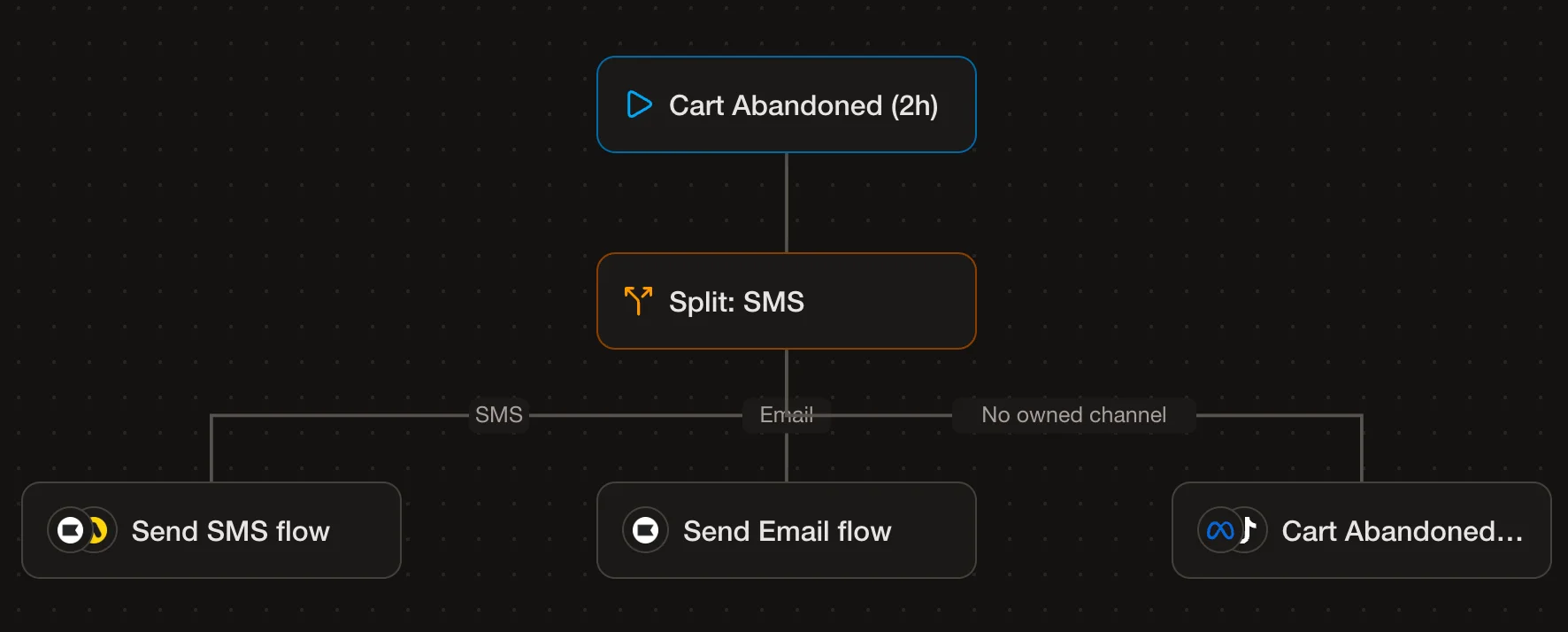
This is the layer that ties the Builder objects together:
- Events capture what happened.
- Conversions define the business outcomes.
- Segments define who qualifies.
- Flows decide when those pieces should run together.
- Actions are the steps a flow runs when something should happen: send a signal, sync an audience, update the CRM, or trigger a lifecycle platform.
Flow templates are the practical entry point today. They create or reuse the Events, Conversions, Segments, and Actions needed for a complete workflow.
Do not confuse a Builder Flow with a Klaviyo Flow or an Attentive Journey. A Builder Flow is Kleerr's orchestration layer. It decides who qualifies, when to wait or branch, and which Builder Actions should run. Klaviyo, Attentive, and ad platforms still control the messages, campaign sends, ad delivery, creative, budgets, and platform-side rules.
For related overview docs, see Identity and session coverage and Data readiness and coverage.
Why flows matter
Without flows, a team can define good signals but still operate them manually: one conversion for reporting, one segment for ads, one action for CAPI, and a separate lifecycle setup somewhere else. Flows connect those pieces into one auditable workflow.
Use flows when the marketing operation has timing, branching, or multiple destinations:
- cart or checkout abandonment recovery;
- browse, search, or product-interest retargeting;
- buyer suppression and lookalike seed refresh;
- post-purchase upsell or second-purchase push;
- replenishment reminders;
- welcome series;
- lead capture to CRM plus ad-platform feedback;
- closed-won or high-quality lead signals back to ad platforms.
The value is consistency. The same event, conversion, segment, and action logic can feed reporting, CAPI, audience sync, lifecycle messaging, and CRM updates without each team rebuilding its own version of the workflow.
Template setup today
Flow execution is being introduced in stages. Template setup can already resolve and build the underlying Events, Conversions, Segments, and Actions. In workspaces where full flow execution is not enabled yet, the final create-flow step is shown as coming soon.
This means flows are still useful during setup. A template can show the complete workflow, identify missing dependencies, and help create the objects that will be used once the flow is active. For many teams, that is the fastest way to get from "we know the campaign we want" to "the conversion, segment, and actions are defined correctly."
How flows interface with Builder
A Builder Flow is the orchestration graph. It does not replace Events, Conversions, Segments, or Actions. It connects them and decides when Actions should run.
Read the objects this way:
- Events say what happened.
- Conversions say which events should count as business outcomes.
- Segments say who qualifies for an audience.
- Flows decide when someone enters, waits, branches, reaches an Action, or exits.
- Actions define what happens at that step: CAPI, audience sync, lifecycle event, list update, or CRM update.
Templates and dependency setup
Templates are the cleanest starting point for common workflows. A template is a recipe that checks existing Builder objects, creates only the missing pieces, then seeds the flow graph.
Example: a Cart Abandonment template may reuse the existing Add to Cart and
Purchase events, create a Cart Abandoned segment, create recovery email and
CAPI actions, then seed a flow that waits, checks for purchase, runs actions,
and exits.
Flow structure
A flow has:
- an enrollment rule;
- a graph;
- optional goal conversion;
- optional guardrails;
- operational stats.
Flow enrollment can be event-triggered, segment-based, once ever, every time, or cooldown-based.
Flow nodes
| Node | Meaning |
|---|---|
| Action | Run a Builder Action. |
| Delay | Wait for a duration. |
| Branch / route | Route based on a condition. |
| Multi-split | Route across multiple condition cases. |
| A/B split | Split traffic by configured weights. |
| Segment change | Add or remove the user from a segment. |
| Exit | End the flow. |
Flow guardrails can store policy context such as priority category, message capacity, frequency window, and exit rule.
Example flow graph
A cart-abandonment flow is a practical example because it uses almost every Builder object type without needing custom code.
The flow is the decision path. Builder Actions are the execution steps it runs. The connected platform still controls message content, ad delivery, budgets, creative, and platform-side eligibility.
Flow templates
Flow templates include setup details and dependency stages:
- impact level;
- effort level;
- tags;
- business goal;
- required integrations;
- alternative integration groups, such as Klaviyo or Attentive;
- objects the template creates;
- the flow graph it will seed.
Template setup shows:
- preview of the recipe;
- dependency stages;
- which blocks already exist;
- which blocks will be created;
- identity carried from one block to the next;
- integration prerequisites;
- final flow preview.
Available flow templates
| Template | Goal | What it builds |
|---|---|---|
| Cart / Checkout Abandonment | Recover revenue | Add-to-cart event, abandoned cart segment, recovery email/SMS/CAPI actions, and a recovery flow. |
| Purchase to Ad Platform CAPI | Increase ROAS | Purchase conversion, buyer segments, and purchase CAPI action for ad-platform optimization. |
| Welcome Series | Retention/loyalty | Email signup event, new-subscriber segment, welcome action, and welcome flow. |
| Buyer Suppression Sync | Audience hygiene | Recent buyer segment and suppression audience sync. |
| Browse Abandonment Retargeting | Recover revenue | Product-view event, browse-abandoner segment, and nudge/CAPI actions. |
| Search Abandonment Retargeting | Recover revenue | Site-search event, search-abandoner segment, and search nudge/CAPI actions. |
| Post-Purchase Upsell | Retention/loyalty | Purchase-triggered flow that branches first-time versus repeat buyers. |
| Customer Winback | Recover revenue | Lapsed-customer segment, winback email, audience sync, and follow-up offer. |
| Second Purchase Push | Retention/loyalty | No-reorder segment and cross-sell/audience actions. |
| Replenishment Reminder | Retention/loyalty | Replenishment segment, email-first reminder, then ad audience sync if needed. |
| VIP Lookalike Seed | Increase ROAS | VIP customer segment, seed audience sync, and VIP perks flow. |
| Lead Capture to CRM and Ad CAPI | Improve lead quality | Contact form event, qualified lead conversion, lead segment, CRM sync, and Lead CAPI. |
| Closed-Won to Ad Platforms | Pipeline growth | Deal-won event, closed-won conversion, customer segment, and closed-won CAPI. |
Template ideas and use cases
Use flow templates when the workflow needs more than one Builder object and a marketer should not have to wire every dependency manually.
| Use case | Flow template to start from | Starts with | Routes to |
|---|---|---|---|
| Recover cart revenue | Cart / Checkout Abandonment | Add to Cart or Checkout. | Email/SMS if identified, paid audience if anonymous. |
| Improve purchase bidding | Purchase to Ad Platform CAPI | Purchase conversion. | CAPI action and buyer suppression audience. |
| Welcome new subscribers | Welcome Series | Email signup. | Lifecycle welcome action, then engaged subscriber segment. |
| Suppress wasted spend | Buyer Suppression Sync | Recent Buyers segment. | Ad-platform exclusion audience. |
| Recover browse intent | Browse Abandonment Retargeting | Product Viewed event. | Product-interest audience and paid retargeting action. |
| Win back lapsed buyers | Customer Winback | Lapsed Customers segment. | Owned lifecycle action, then paid retargeting if needed. |
| Grow premium audiences | VIP Lookalike Seed | VIP Customers segment. | Seed audience sync and optional VIP lifecycle action. |
| Route qualified leads | Lead Capture to CRM and Ad CAPI | Form or demo event. | CRM update, Lead CAPI, and sales follow-up segment. |
| Send offline revenue | Closed-Won to Ad Platforms | Closed Won conversion. | Offline CAPI and customer suppression audience. |
The right template should make the first working loop obvious: what enrolls the person, which route they take, which actions run, and what exits them from the workflow.
Lifecycle platform examples
| Workflow | Kleerr building blocks | Connected platform behavior |
|---|---|---|
| Cart recovery flow | Cart Abandoned segment plus email/SMS action. | Klaviyo Flow or Attentive Journey sends recovery messages when Kleerr triggers the lifecycle event or syncs segment entry. |
| Welcome series | Newsletter Signup event plus New Subscriber segment and lifecycle action. | Klaviyo or Attentive sends the welcome sequence according to its own flow/journey rules. |
| Klaviyo campaign list | Segment or conversion source plus Klaviyo campaign-list sync. | A marketer schedules the one-time campaign in Klaviyo; Kleerr keeps the audience list current. |
| Winback | Lapsed Customer segment plus email/SMS action or ad audience sync. | Lifecycle platform sends the winback message, or ad platform serves to the synced audience. |
Template examples
Cart abandonment recovery
- Event: Added to Cart fires when Shopify reports a product added to cart.
- Segment: Cart Abandoned waits for the account's Abandoned Cart Delay (2 hours by default) and exits if Purchase happens.
- Action: Cart Recovery Email or SMS triggers the lifecycle platform workflow that sends the recovery message.
- Action: Cart Abandoned CAPI sends server-side intent to eligible ad platforms.
- Optional Action: a List Audience sync can keep a cart-abandoner audience current for retargeting or suppression where the ad platform supports it.
- Flow: enrolls the abandoned-cart segment, waits or branches if needed, sends the action, and exits on purchase.
Why it matters: it separates a raw cart event from a true abandonment audience, so buyers who return quickly are not treated as abandoned.
Purchase CAPI
- Event: Purchase is the completed Shopify checkout.
- Conversion: Purchase counts the order and value.
- Segments: First-Time Buyer and Repeat Buyer split acquisition versus retention audiences.
- Action: Purchase CAPI sends the clean purchase signal to eligible ad platforms.
- Optional Action: a buyer List Audience sync can support suppression or lookalike seeds.
Why it matters: ad platforms optimize better when they receive reliable server-side purchase signals grounded in commerce orders. For how Kleerr routes those signals to eligible ad touchpoints, see Kleerr CAPI overview.
Lead capture
- Event: Contact Form Submitted is selected from the real site form.
- Conversion: Qualified Lead counts the submitted lead.
- Segment: Leads holds captured leads.
- Actions: sync the lead to CRM and send Lead CAPI to ad platforms.
- Flow: connects the lead signal to CRM and ad-platform feedback.
Why it matters: lead-generation teams can optimize on qualified downstream intent rather than raw page visits.
Flows list columns
The Flows gallery table has these columns: Flow, Status, Members, Enrollments, Completions, Completion rate, Errors, Error rate, Last updated.
| Column / metric | Meaning |
|---|---|
| Flow | Flow name plus a small node-graph preview with type and node count. |
| Status | Live/active, Draft, Archived, or Deleted. |
| Members | People currently active in this flow. |
| Enrollments | People who have entered this flow all time. |
| Completions | Contacts who reached the end of this flow. |
| Completion rate | Completions as a share of total enrolled. |
| Errors | Flow actions that failed to run or deliver. |
| Error rate | Errors as a share of total flow actions. |
| Last updated | When the flow was last modified. |
Flow status labels differ from the other entities. Live means active. Draft means inactive/not running. Deactivating a live flow sets it to Draft.
Audit checklist
If a flow looks wrong, check:
- whether Flows are enabled for the workspace;
- flow status: Live, Draft, Archived, or Deleted;
- enrollment rule;
- missing or archived Events, Conversions, Segments, or Actions;
- identity requirements for actions inside the flow;
- execution status for flow creation and runtime;
- error count and error rate.